Texas Physicians: CME/CE Credit Tracking with Propelus CE Broker®
Starting September 1, 2026 health care practitioners licensed by the Texas Medical Board will be required to have their continuing education compliance verified through CE Broker. CE Broker is a tracking system for your credits.
For more information from the Texas Medical Board, click here.
How can BCM Clinician Resources help physicians? Please refer to the FAQs below.
Baylor College of Medicine + CE Broker connection
Last updated: November 4, 2026
The BCM Division for Continuing Professional Development has gone live with its integration with Propelus CE Broker®.
With your authorization, credits earned through CME activities accredited by Baylor College of Medicine can be automatically reported to CE Broker for physicians only.
Please note: CME credits you earn from other institutions or organizations will not be submitted to CE Broker from BCM.
Credit reporting authorizations: To authorize BCM to submit your credits to CE Broker, you will need to update your profile. Mark the CE Broker box and also verify and complete your medical license information.
Enable CE Broker Reporting
1. Update your BCM Clinician Resources profile.
- Check the box authorizing credit reporting to CE Broker.
- Ensure your medical license information is complete and accurate.
2. Review the FAQs below for guidance specific to your circumstances and practice location.
Subscribe here to the BCM CME monthly newsletter to access the latest on demand AMA PRA Category 1 Credit™ activities and to receive updates on this integration.
FAQ
The CE Broker dashboard may not display updates in real-time.
We recommend downloading your CE Broker transcript to review in detail what credits have been reported to CE Broker.
If you have authorized us to transfer your credits, it may take 24 hours from the time you opted in or 24 hours from the time you claimed credit to reflect in your CE Broker account.
You may wish to download your CE Broker transcript and your BCM CME transcript to compare.
On your CE Broker transcript, calculate your credits (for AMA PRA Category 1 Credit™, Ethics, and Pain Management) by reviewing the "Subject areas covered" and the "Credits earned" columns. You can then compare these numbers with the requirements of your state’s medical board and your BCM CME transcript.
BCM currently reports only physicians' credits to CE Broker for Texas physicians with a full medical license with the Texas Medical Board.
Physicians with trainee licenses (e.g., Fellows) or faculty "temporary" licenses should review their own requirements on the Texas Medical Board website.
Non-physician licensees must self-report their credits directly into CE Broker. Please review your Board's requirements.
A course title alone does not determine whether it qualifies for Human Trafficking Prevention, Ethics, or Pain Management credit. Activities must meet specific accreditation criteria and be approved for those credit types. Always review the activity's credit designation statement course materials or promotional flyer to confirm the credits awarded.
Please note: The BCM Division of Continuing Professional Development does not accredit Human Trafficking Prevention courses. For a list of approved training options from Texas Health and Human Services, please visit:
Human Trafficking Prevention Course List | Texas Health and Human Services
Please see the Texas Medical Board's website for more information about Propelus CE Broker® and CE tracking.
It is possible that you may have more than one account. Please contact clinicianresources@bcm.edu for assistance with locating and/or merging your accounts.
Click here to review your BCM-accredited completed activities and download your transcript.
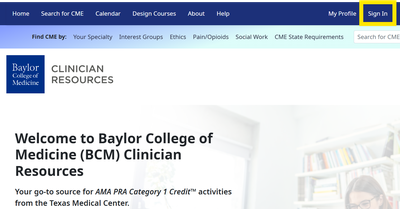
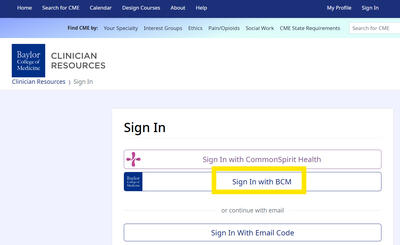
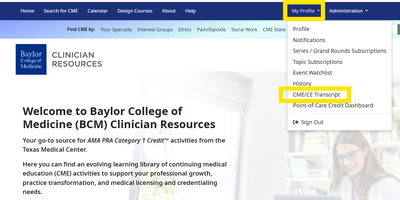
The way you sign in matters. Please follow the steps and images provided.
Step 1: Sign in at the top of the BCM Clinician Resources website.
Step 2: Click the "Sign In with BCM" button.
Step 3: Click "My Profile" and CME/CE Transcript.
We only will be submitting CME credits for physicians with a full license from the Texas Medical Board. You must provide authorization in your BCM Clinician Resources profile
Physicians with trainee licenses (e.g., Fellows) or faculty "temporary" licenses should review their own requirements on the Texas Medical Board website.
BCM cannot report credits you earn through CME activities accredited by other organizations. Contact the course provider to determine if those credits will be reported to CE Broker automatically.
If you log in to BCM Clinician Resources with your VA email address and do not see your CME transcript, you may want to log in with your BCM email using the “Sign in with BCM” option. Your CME credits and transcript may be associated with your BCM account rather than your VA account. If you still have questions, please contact clinicianresources@bcm.edu.
No. Please contact the Texas Children’s Hospital CME office at cepd@texaschildrens.org or visit https://tc.cloud-cme.com/default.aspx for their process and your CME transcript.
For CME activities you completed at Texas Heart Institute in 2025 or earlier, you will need to submit your credits to CE Broker manually. Please contact dvykoukal@texasheart.org or visit https://www.texasheart.org/education/professional-education-events-resources/my-cme-portal/ for your CME transcript.
If BCM is the accrediting provider for the activity and you have provided authorization, your CME credits will be submitted to CE Broker on your behalf. Please review the program brochure or contact the activity director to confirm the accrediting provider.
Each CME activity must have an accreditation statement on the program brochure, flyer or activity page, including the name of the accrediting provider. Please contact the Activity Director.
CME Reminders Directly to Your Inbox
Don’t wait until your license expires.
Join thousands of providers are receiving the latest on-demand AMA PRA Category 1 Credit™ accredited activities monthly.
Sign up for the BCM CME newsletter.